This is how I attach pictures.
1. Download the free Photobucket programme. (www.photobucket.com)
Subscribe, and load the picture(s). After you hit the "Submit" box, wait till your image appears. Note that a box at the bottom of the page includes an "Img" filename.
Left click on this filename once to highlight it, then right click to "copy".
2. I like to have both Photobucket and the Jowett forum open at the same time. Swap to the Jowett forum, open the "post a New Topic" or "Reply" page.
3. At a suitable place in your message, right once click on the "Img" box (above). (The symbol [img] and the little box shows an "Img*" to indicate the opening of the procedure.)
4. Right click and "paste" the code fromPhotobucket, then click on into the Img* box.
Your photo filename should be now between the [img]and%20the[/img] symbols thus:
[img][img]http://i39.photobucket.com/albums/e195/ ... /Brolt.jpg[/img]
5. Submit your message in the ordinary way.
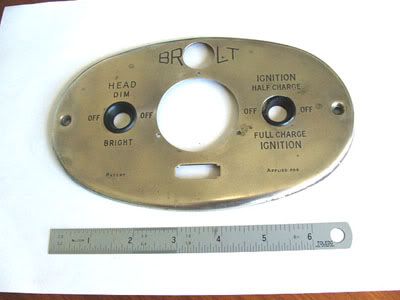
I am attaching a picture of the Brolt dash panel which I believe came from a Jowett between 1911 and 1924, the period when Brolt was in existance.
Jack Watson
Using Photobucket to add Pics
-
Jack Watson
- Posts: 6
- Joined: Mon Feb 27, 2006 3:00 am
- Location: Perth, Western Australia
-
Keith Clements
- websitedesign
- Posts: 3976
- Joined: Wed Feb 08, 2006 11:22 am
- Your interest in the forum: Jup NKD 258, the most widely travelled , raced and rallied Jowett.
- Given Name: Keith
- Contact:
-
Keith Clements
- websitedesign
- Posts: 3976
- Joined: Wed Feb 08, 2006 11:22 am
- Your interest in the forum: Jup NKD 258, the most widely travelled , raced and rallied Jowett.
- Given Name: Keith
- Contact:
-
Keith Andrews
- Posts: 941
- Joined: Wed Jul 26, 2006 8:11 am
- Location: New Zealand
- Contact:
Guest above was me
This is certainly the way to go..thu it does have its draw backs.
If users use some hot mail and yahoo mail a/cs, or some Canadian, most Aussie isp mail a/cs these will reject the mail, (and any replies to post mail.) This much depends on what mail server the site is using.
In effect they dont get the regist email with the link to confirm their membership.
The way around this is to check the mail server each day for rejected mail. Forward the registation email from another mail server, adding "your email was rejected as spam from your mail server. We have manually confirmed your registration, logon as normal."
If the email is still rejected with email doesnt exist, dont manually confirm their membership.
Sounds like a hassle, but it is far less work than continually removing boggus posts and memberships.
Cheers
Steps
This is certainly the way to go..thu it does have its draw backs.
If users use some hot mail and yahoo mail a/cs, or some Canadian, most Aussie isp mail a/cs these will reject the mail, (and any replies to post mail.) This much depends on what mail server the site is using.
In effect they dont get the regist email with the link to confirm their membership.
The way around this is to check the mail server each day for rejected mail. Forward the registation email from another mail server, adding "your email was rejected as spam from your mail server. We have manually confirmed your registration, logon as normal."
If the email is still rejected with email doesnt exist, dont manually confirm their membership.
Sounds like a hassle, but it is far less work than continually removing boggus posts and memberships.
Cheers
Steps
My Spelling is Not Incorrect...It's 'Creative'